Most of people have problems on playing M4V video. After they bought M4V videos from iTunes store, you want to play them on your own player. But DRM protected M4V, so, you could not play purchased M4V or M4V rental on your own player. DRM protected M4V can only play on 5 devices. So, if you want to play M4V on your devices, you have to convert protected M4V to unprotected.
M4V Converter Plus is your best choice to remove DRM protection. With it, you could remove the purchased and rental M4V protection. And then you can play unprotected M4V video on any devices. You can download M4V Converter Plus and make free try.
As M4V converter, you could convert M4V format to MP4, MOV, or customize parameter for iPod, iPhone. After conversion, you can play the unprotected MP4 on your Zune, PSP, PS3, or other players you like.


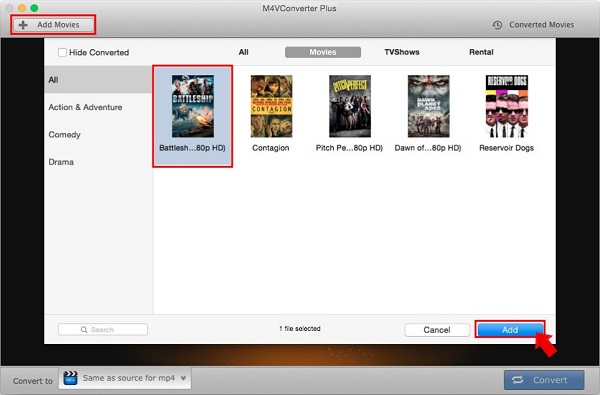
M4V Converter Plus is not only a iTunes M4V Converter, also a DRM removal software. It can well compatible with Mac and Windows platforms. The following tips about how to use M4V Converter Plus on Mac OS, and you can learn to convert M4V to MP4. At first, you can download the M4V to MP4 Converter, install and launch it.
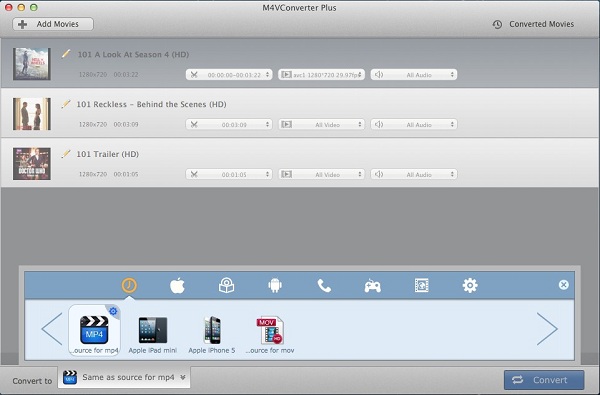
The format are categorized by different platforms. You can choose your portable devices in the profile list directly like iPhone, android phones, PSP, Xbox 360, etc.

